Spring is here, and suddenly your afternoon video calls are unbearable again.
You’ve tried everything. The $200 ring light. The expensive webcam. The “flattering” angle. You even bought a green screen.
But now that the sun is higher and stronger, by 2 PM you’re squinting from glare. Your eyes are strained. That screen reflection makes it impossible to see your presentation while colleagues can barely see you.
And your home office? It’s already hitting 78 degrees during afternoon meetings—and it’s only March.
The problem isn’t your setup. It’s your window. And it’s about to get worse as we head into summer.
The Remote Work Reality Nobody Warned You About
As we enter Q2 2026, 62% of knowledge workers are now hybrid or fully remote—up from 58% last year. That’s 95 million Americans working from home at least part-time. And the majority positioned their desks near windows for “natural light benefits.”
But spring sunlight is particularly brutal for video calls. The sun is higher in the sky, creating more direct glare. Days are longer, meaning more afternoon calls during peak sun hours. And warming temperatures mean your AC hasn’t kicked in yet, but solar heat is already building.
Here’s what’s happening during your March video calls:
Mid-morning calls (9-11 AM): Spring sun creates harsh shadows and washes out your face. Your camera’s auto-exposure struggles as the sun gets higher each week.
Afternoon calls (2-5 PM): Peak glare season. Sun angle is perfect for hitting your screen directly. You’re squinting, looking disengaged, missing visual cues.
All-day problem: Uncontrolled solar heat is raising your office temperature 12-18 degrees now that spring sun is stronger. You’re uncomfortable, and by May it’ll be unbearable. Your AC costs are about to spike $60-100 monthly just to video conference comfortably.
Why This Destroys Your Professional Presence
Video calls aren’t just communication—they’re performance. And spring 2026 research from Cornell University confirms what remote workers suspected: professionals who appear poorly lit, uncomfortable, or distracted on video calls are 34% less likely to be selected for promotions compared to in-office peers.
With more companies finalizing their permanent hybrid policies this quarter, your video presence is under more scrutiny than ever.
The perception problem:
- Squinting = disinterested
- Poor lighting = unprofessional
- Visible discomfort = not taking meetings seriously
- Glare obscuring your face = disengaged
And here’s the March problem: You have 60-90 days before summer makes this exponentially worse. The glare and heat you’re experiencing now? It’s going to double by June. Companies making promotion decisions in Q2 and Q3 are watching your video presence right now.
Your window is actively sabotaging your career advancement.
The “Solutions” That Don’t Actually Work
Closing Blinds/Curtains: You lose the natural light benefits entirely. Multiple studies show natural light exposure improves mood, focus, and productivity by 15-25%. Closing blinds to fix video calls means spending 8 hours in a dark cave—trading one problem for another.
Repositioning Your Desk: Most home offices have limited layout options. Moving your desk away from windows often means facing a wall (terrible for psychology) or positioning near doors (traffic and noise). Plus, you’re still dealing with ambient heat from unprotected windows.
Ring Lights and Filters: These add artificial light but don’t address the root cause—uncontrolled, harsh natural light overwhelming your space. You’re compensating rather than solving. Plus, ring lights create an obvious “artificial” look that screams “I’m overcompensating.”
Only Taking Morning Calls: Not realistic for most professionals. Your schedule doesn’t care about sun position. Clients, colleagues, and managers expect availability during afternoon hours.
The Window Film Solution for Video Professionals
Modern spectrally selective window film solves every video call problem simultaneously:
Eliminates Glare Without Blocking Light: Filters harsh direct sunlight while maintaining 60-70% visible light transmission. Your space stays naturally bright, but the blinding glare disappears. You can see your screen clearly while remaining well-lit.
Balances Lighting for Camera Auto-Exposure: Reduces extreme brightness differences between you and background windows. Your camera’s auto-exposure works properly, creating even, professional lighting that would cost thousands to replicate with artificial lights.
Reduces Solar Heat by 78%: Your home office stays comfortable during afternoon calls without blasting AC. No more sweating through presentations or positioning fans that create noise on your microphone.
Maintains Natural Light Benefits: You keep the mood, focus, and productivity benefits of natural light exposure—critical for remote workers spending entire workdays in home offices.
Creates Consistent Appearance All Day: Whether it’s 9 AM or 4 PM, your video presence remains consistent. No more “morning person vs afternoon zombie” appearance changes.
Real Remote Workers, Real Results
Sarah Martinez, Marketing Director, Denver:
Before window film: “Afternoon client calls were brutal. I couldn’t see my screen, I was sweating, and I knew I looked terrible on camera. I started scheduling everything before 2 PM, which meant declining West Coast meetings.”
After installation ($2,100 for home office + adjacent rooms):
- Takes meetings anytime without screen glare
- Office temperature dropped 14 degrees
- AC costs down $65/month
- “Clients comment on how professional my setup looks now”
- ROI: 18 months through energy savings alone
Marcus Chen, Software Engineer, Austin:
Before: “I had blackout curtains because afternoon sun was unbearable. Worked in the dark for 6 hours daily. My manager commented that I seemed ‘less energetic’ on afternoon calls.”
After installation ($1,800):
- Keeps curtains open all day
- Natural light improved his mood and focus
- Video call appearance dramatically better
- Temperature comfortable without cranking AC
- ROI: 16 months
The Hybrid Work Advantage
For hybrid workers splitting time between home and office, window film creates parity in professional presence:
Office Days: Professionally designed lighting, climate control Home Days: Now have equivalent visual quality and comfort
This consistency matters. A University of Michigan study found that hybrid workers with equivalent home/office setups were 28% more likely to receive remote work approvals compared to those with clearly inferior home environments.
Your video presence signals whether you take remote work seriously.
The Cost-Benefit for Remote Professionals
Investment: $1,500-$3,000 (typical home office plus adjacent rooms)
Immediate Returns:
- Energy savings: $60-100/month starting April ($720-1,200 annually through summer)
- Eliminated need for ring lights, filters: $200-400
- Avoided window AC unit or fans: $200-600
- Improved professional appearance: Priceless for Q2/Q3 promotion cycles
Payback Period: 12-18 months through energy savings alone—faster than winter installations due to higher cooling costs ahead
Spring Installation Advantage: Install now before summer heat peaks. Avoid the June rush when installer wait times double and you’re desperate. Plus, you’ll have the solution in place before Q2 performance reviews and summer client meetings.
Intangible Benefits:
- Comfortable work environment all day
- Better focus and productivity (natural light benefits retained)
- Professional video presence without artificial compensation
- Ability to schedule meetings anytime without sun concerns
- Furniture, flooring, equipment protected from UV fading (critical with stronger spring/summer sun)
Tax Credit Opportunity for Home Office
If you have a dedicated home office, window film may qualify for the 30% federal energy efficiency tax credit (up to $600 for residential).
For qualifying home offices, that’s potentially $450-900 back on your installation, further shortening ROI.
Beyond Video Calls: The Zoom Fatigue Connection
Emerging research links “Zoom fatigue” to environmental factors, not just screen time:
Cornell Tech Study (2024): Workers in spaces with uncontrolled natural light, temperature discomfort, or glare reported 47% higher video call fatigue compared to those in properly managed spaces.
The fatigue isn’t just psychological—it’s physiological:
- Squinting causes eye strain and headaches
- Temperature discomfort increases stress hormones
- Harsh lighting creates continuous low-level sensory stress
- Glare forces constant screen repositioning (neck/shoulder strain)
Window film addresses the environmental factors contributing to video call exhaustion.
What to Look for in Home Office Window Film
Not all window films work for video conferencing. You need:
High Visible Light Transmission (60-70%): Maintains natural brightness needed for camera lighting and psychological benefits.
Low Solar Heat Gain Coefficient (0.25-0.35): Blocks heat without creating cave-like darkness.
99% UV Blocking: Protects you, your equipment, and your furniture from radiation damage.
Non-Reflective Interior Finish: Some cheaper films create mirror effects that reflect your screen or create weird lighting artifacts on video.
Professional Installation: Bubbles, peeling, or improper application creates distracting visual imperfections that show up on video calls.
Quality brands meeting these specs:
- 3M Prestige Series (ceramic, non-metallic)
- Eastman LLumar Select Series
- CoolVu Transitional Film (adjusts to sun intensity)
The Simple Assessment Test
Do this right now—especially important in March as sun angle changes:
- Sit at your desk during peak glare time (usually 1-4 PM in March for south/west-facing windows)
- Open a video call (Zoom, Teams, whatever you use)
- Look at yourself on camera
If you’re squinting, can’t see your screen clearly, or look washed out/shadowed—your window is the problem. And it’s only going to get worse as spring progresses into summer.
Check your temperature: If your home office is already 5+ degrees warmer than other rooms during afternoon hours in March, you’re looking at 15-20 degree differences by June. Uncontrolled solar heat is about to become unbearable.
Count your workarounds: Ring lights? Repositioned desk? Scheduled around sun? Closed blinds? Each workaround is costing you money, comfort, or productivity. And spring sun is exposing these “solutions” as temporary patches.
The March advantage: Install now and you’ll have 60-90 days of testing before summer heat peaks. You’ll be comfortable and professional-looking while colleagues are scrambling in June.
Installation Process for Remote Workers
Spring 2026 Timing Advantage:
March-April are optimal installation months. Installers have better availability before the summer rush. You’ll have your solution in place before peak heat and glare season.
Consultation (30-45 minutes): Installer assesses your workspace, window orientation, video call setup. Recommends specific films for your lighting needs and discusses summer preparation.
Installation (2-4 hours for typical home office): Usually scheduled during your workday without disrupting your evening. Most remote workers book morning installations, then use their improved office that same afternoon.
Current Wait Times (March 2026):
- Residential home office: 1-2 weeks
- By May/June: Wait times extend to 3-5 weeks as demand spikes
Curing Period (3-5 days): Film appearance optimizes as adhesive sets. Functional immediately, optimal appearance within a week.
Long-term Performance: 10-15 year warranties. No maintenance beyond normal window cleaning. One-time investment that protects you through every future spring and summer.
The Competitive Advantage
As remote and hybrid work becomes permanent, your home office IS your office. The professionals investing in equivalent environments aren’t being extravagant—they’re being strategic.
When two candidates with similar qualifications compete for a promotion, and one consistently looks professional on video while the other appears uncomfortable and poorly lit—who gets promoted?
When a client chooses between two consultants, and one has a polished, professional home office while the other clearly struggles with their setup—who gets the contract?
Your window is either an asset or a liability. Right now, for most remote workers, it’s a liability.
Take Action This Week
The March Window:
You have a 60-90 day opportunity to solve this before summer makes it urgent. Install now while:
- Installer availability is good (1-2 week lead times vs 4-6 weeks in June)
- You can test the solution through spring before summer peaks
- Q2 promotion cycles haven’t closed
- Your 2026 tax planning still has time (30% federal credit available)
Day 1-2: Do the assessment test during peak afternoon glare hours (1-4 PM). Document the problems with screenshots during video calls.
Day 3: Contact certified installers for consultations. Get specific recommendations for your space and summer preparation.
Day 4: Request quotes. Verify films meet the specs (VLT, SHGC, UV blocking, non-reflective interior).
Day 5: Schedule installation. Most can complete home office work within 2 weeks in March/April.
Bonus: If you’re claiming the home office tax deduction on your 2026 return, your window film installation may be deductible as a business expense. Consult your tax professional during spring tax planning.
The Bottom Line
Spring 2026 is here. The sun is stronger. Days are longer. Your afternoon video calls are already uncomfortable—and it’s only March.
You invested in the webcam, the microphone, the desk, the chair, the monitor. You optimized your background, your framing, your audio setup.
But you ignored the single biggest factor determining your video presence: your window.
For $1,500-$3,000, you can:
- Look professional on every video call through summer and beyond
- Stay comfortable during afternoon meetings as temperatures rise
- Reduce energy costs $700+ annually (higher with 2026 summer heat)
- Keep natural light benefits for mood and productivity
- Eliminate squinting, glare, and discomfort
- Create consistent appearance morning through evening, spring through fall
Remote work isn’t going anywhere. Companies are finalizing permanent hybrid policies this quarter. Q2 and Q3 promotion cycles are about to begin. Your professional appearance matters more than ever.
Don’t wait until June when you’re desperate and installers are backed up 6 weeks.
Stop compensating. Start solving. Install now before summer hits.
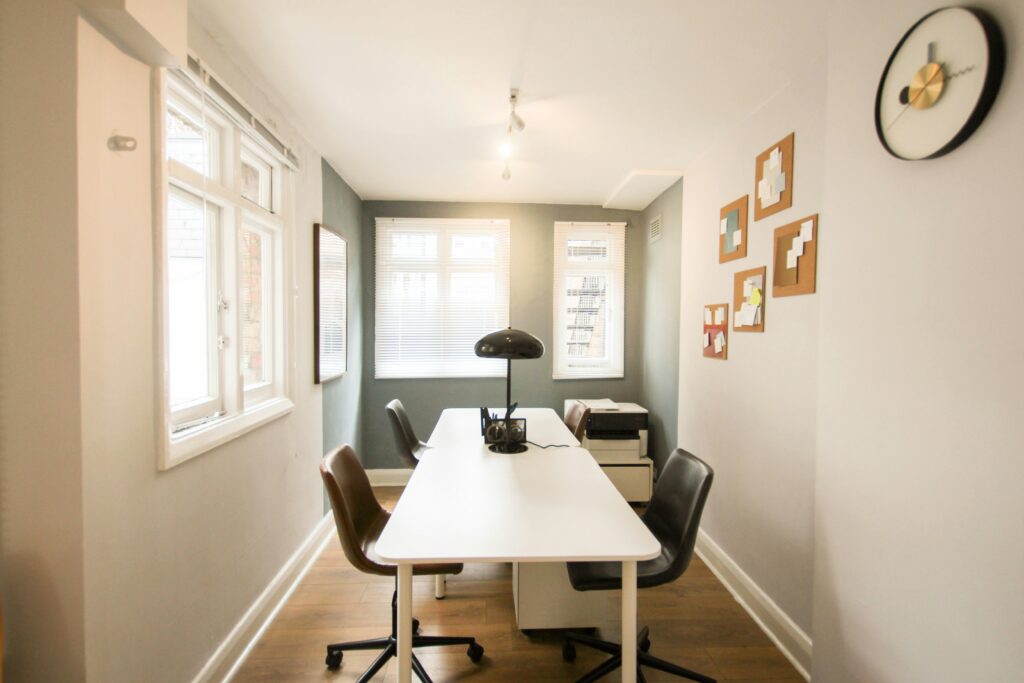
Transform Your Home Office Video Presence
CoolVu specializes in home office window solutions for remote professionals. We understand video call lighting requirements and design installations that enhance your professional presence.
Free Home Office Assessment Includes:
- Video call lighting analysis
- Sun exposure evaluation throughout day
- Energy cost projection
- ROI calculation with tax credit benefits
- Recommended film specifications for your setup
Find your local CoolVu installer: www.coolvu.com
Your video presence is your professional presence. Make it count.